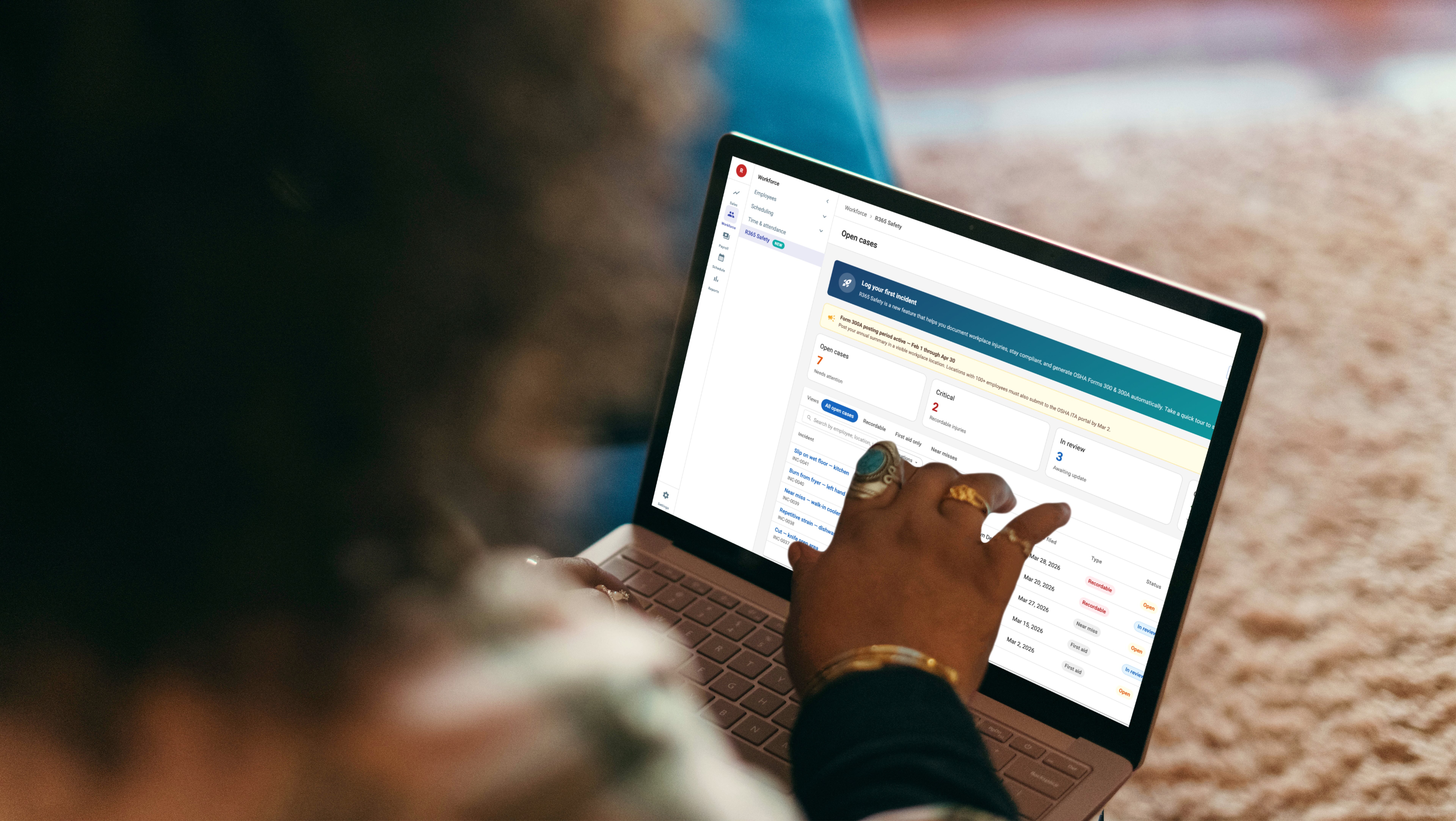


Restaurants are high-injury workplaces. Slips, cuts, burns, repetitive strain — incidents happen weekly, and the federal OSHA standard requires every recordable one to be logged, classified, and rolled up into a Form 300 each year. Today, most R365 customers track this in spreadsheets or paper logs that never line up with what OSHA actually wants to see. R365 Safety is the new module that fixes that — log on the floor, comply by year-end, all inside the system payroll already lives in.
What it delivers to users
For the manager on the floor, incident logging becomes a guided, few-minute task. The right field appears at the right step, and inline guidance explains the compliance terms (recordable, work-related, hospitalization) that non-experts most often get wrong.
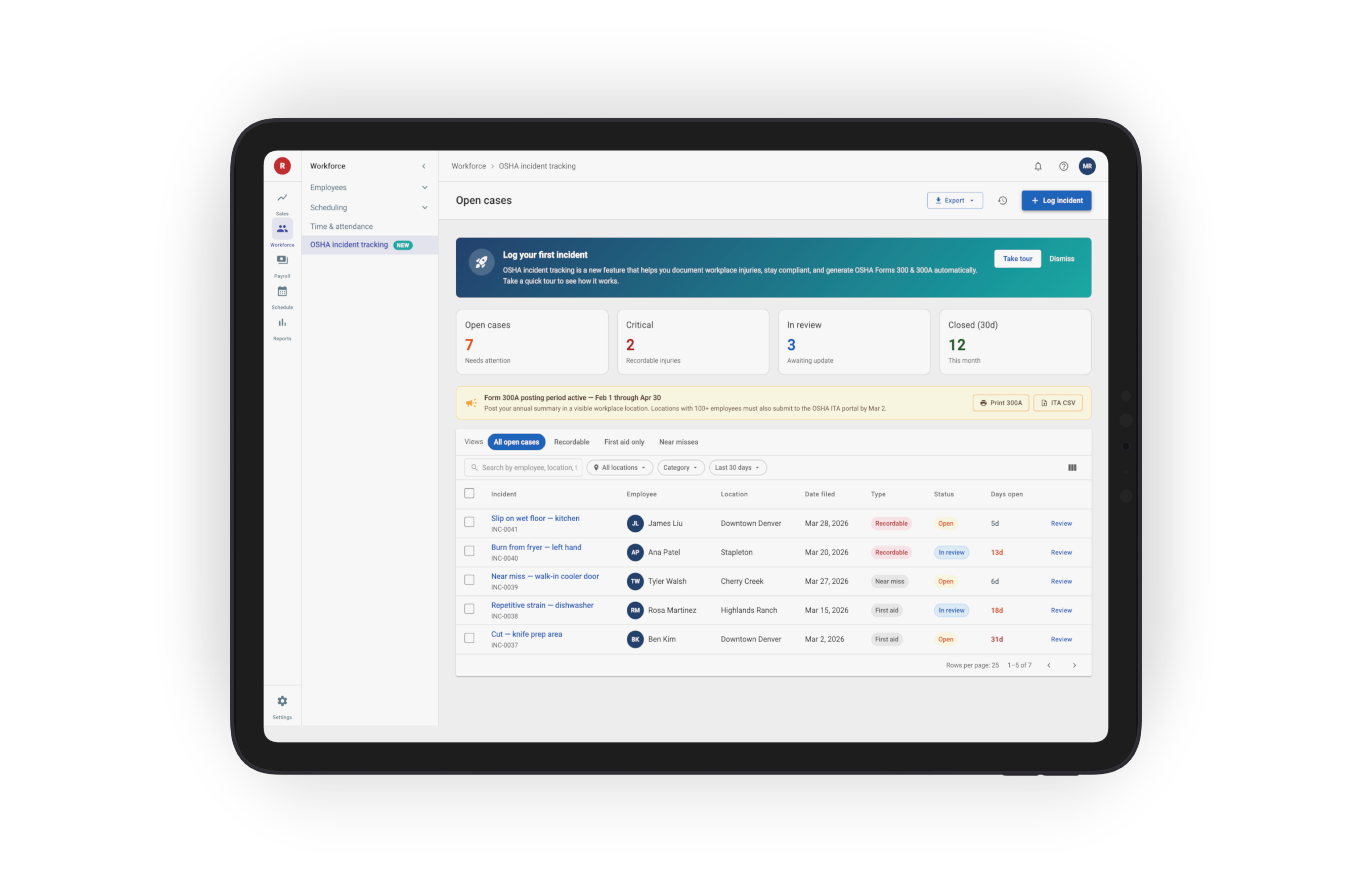
For the HR or safety manager, a single org-wide dashboard consolidates incidents across locations, with one-click export to OSHA Forms 300 and 300A at year-end. No more spreadsheet stitching.
What it delivers to the business
R365 Safety is R365's first dedicated compliance module. It addresses a real customer pain — OSHA penalties can run into six figures per violation — and differentiates Restaurant365 from generic HCM tools by speaking restaurants' actual language. The module unlocks mid-market and enterprise customers who want compliance built into the platform they already use for payroll, not bolted on through a separate vendor.
PROJECT TYPE:
SaaS
Business Facing Products
Web-Based
PROJECT ROLE:
Senior Product Designer
YEAR:
2026
SKILLS:
End-to-end Product Design
AI training and skill building
Design Systems & Scaling
User Research & Usability
Cross-functional Collaboration
PROBLEMS:
OSHA compliance is built for safety managers, not line managers
The federal forms (300, 300A, 301) assume a trained compliance professional is filling them out. Most restaurants don't have one. The manager on duty has a hurt employee, a kitchen to keep running, and a form full of OSHA-specific language they've never been trained on. The result is incidents that don't get logged, get logged wrong, or get logged late — any of which is a violation.

What was broken:
Issue 01
OSHA terminology was difficult for non-specialists
Terms like "recordable," "work-related," and "case classification" are compliance-critical but unfamiliar to most restaurant managers. A single incorrect selection could over-report, under-report, or misclassify an incident.
Issue 02
Incident tracking lived in spreadsheets and paper forms
Most operators managed OSHA reporting manually through Excel or paper logs, with inconsistent fields, no audit trail, and no reliable way to map incidents to the 19 required columns in OSHA Form 300.
Issue 03
Manual entry ate hours
Logging an incident meant repeatedly entering the same information across multiple forms with little validation or workflow guidance. Managers often had to choose between speed and accuracy.
Issue 04
Year-end reporting became a high-risk scramble
Generating OSHA Forms 300, 300A, and 301 required days of cross-referencing incidents, verifying classifications, and manually compiling summaries — increasing the likelihood of reporting errors and missed deadlines.
Issue 05
Critical compliance deadlines were easy to miss
Covered employers must post Form 300A from February 1 to April 30 and electronically submit Form 300 data by March 2. Existing workflows provided no reminders, visibility, or deadline tracking.
Issue 06
Multi-location operators lacked centralized visibility
Incident reporting was fragmented across stores, making it difficult for HR and safety leaders to identify trends, monitor compliance, or manage incidents consistently across locations.
Issue 07
The cost of mistakes was high
OSHA penalties run from $16K to $165K per violation. Missed deadlines, altered records, or incomplete logs are common citation triggers — and falsification is criminal.
Issue 08
Existing tools were not designed for restaurant operations
Generic HCM compliance modules don't speak to industry-specific risks: burns, slips on wet floors, knife cuts, heat exposure, ergonomic strain. The data model doesn't fit.

SOLUTION:
Compliance built into the floor, not bolted on at year-end
The MVP anchors OSHA where managers already work — on the employee profile and a dedicated R365 Safety tab — and covers five connected moments: logging an incident, getting inline guidance for the fields that drive compliance, seeing the org-wide picture, exporting Forms 300 and 300A at year-end, and onboarding new users with an in-product tour. The same data flows from the floor to the federal form, with no double entry and no spreadsheet stitching.

Flow 01 · The 90-second task on the floor
Two entry points, one logging flow
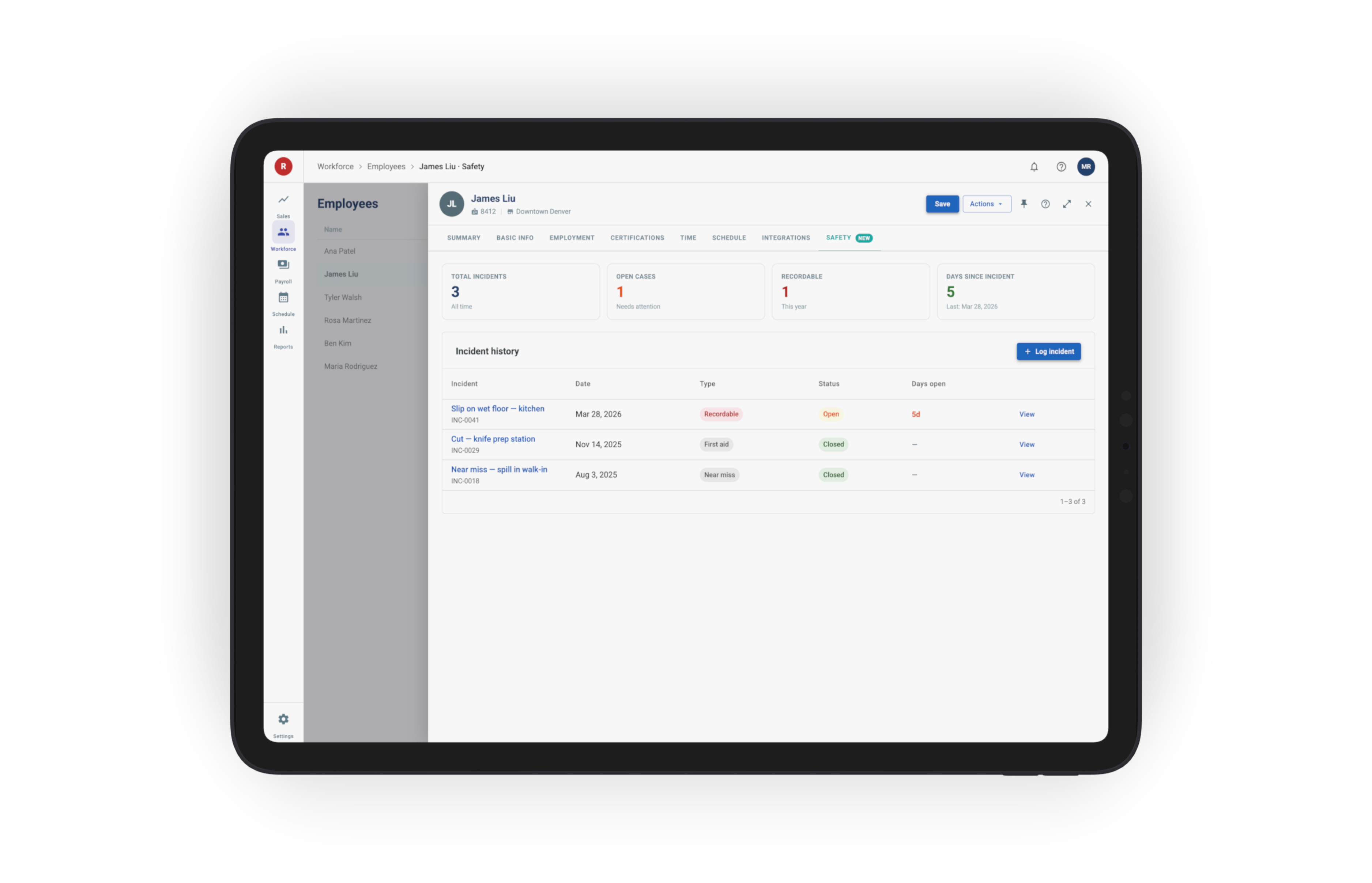
Incidents can be logged from two entry points, both opening the same wizard. From an employee's profile, a new OSHA tab is the entry — useful when the manager already knows who's hurt and is reviewing or updating that employee's record. From the dedicated R365 Safety tab in Workforce, a primary + Log incident button opens the same flow — useful when the manager is starting from the org-wide dashboard or doesn't have the employee record open.
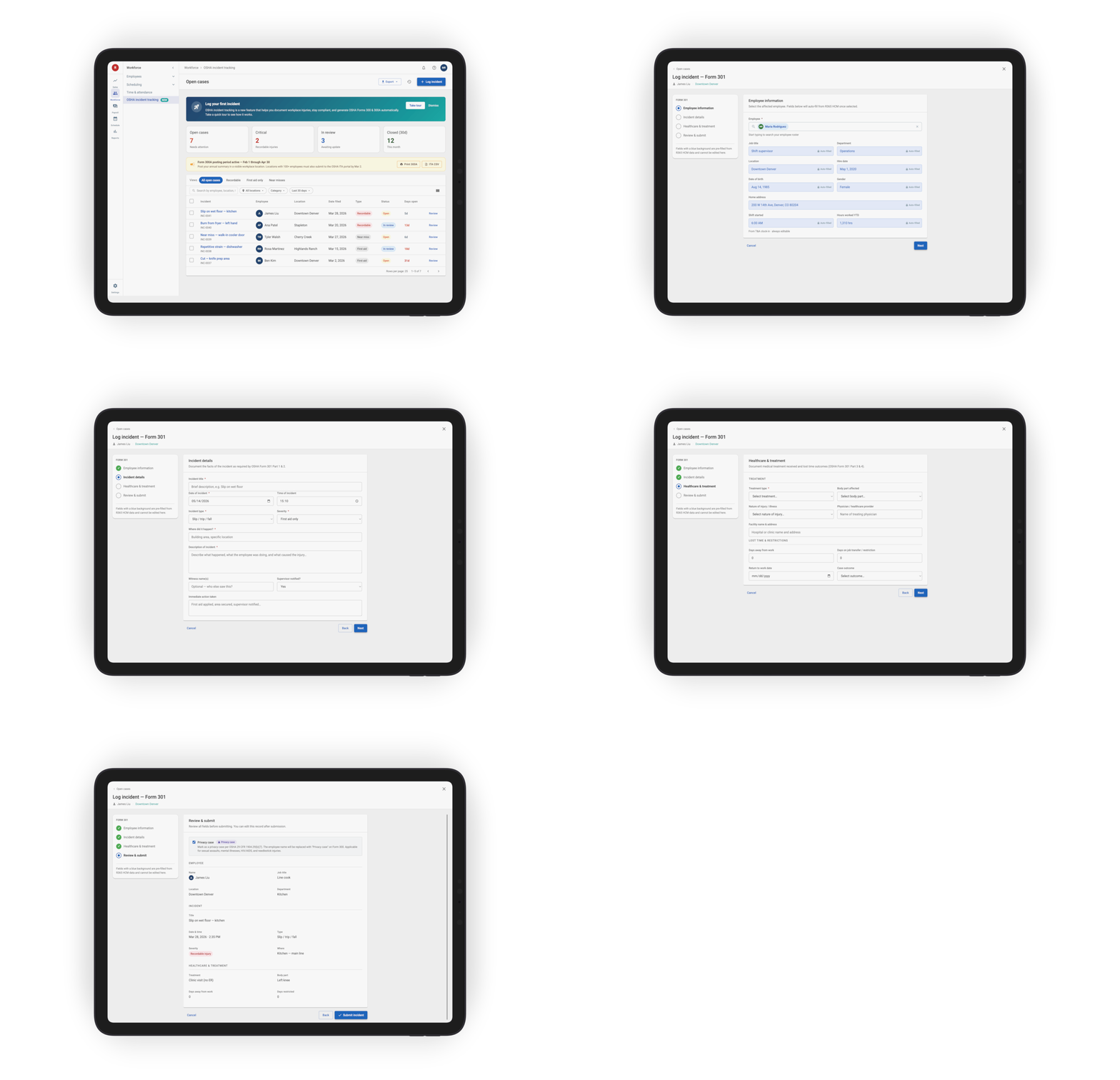
Both entry points open the same focused four-step wizard: Employee information → Incident details → Healthcare & treatment → Review & submit.
Employee information is automatically pre-filled from HCM — including name, ID, job title, hire date, and work location — so managers only enter what is actually new: when the incident happened, where it occurred, what happened, and what actions were taken.
Flow 02 · Compliance built-in
Inline OSHA guidance & compliance alerts
Compliance-critical fields — including recordability, work relationship, case classification, and days away vs. restricted work — include inline guidance with plain-language explanations of the OSHA rules behind each decision.
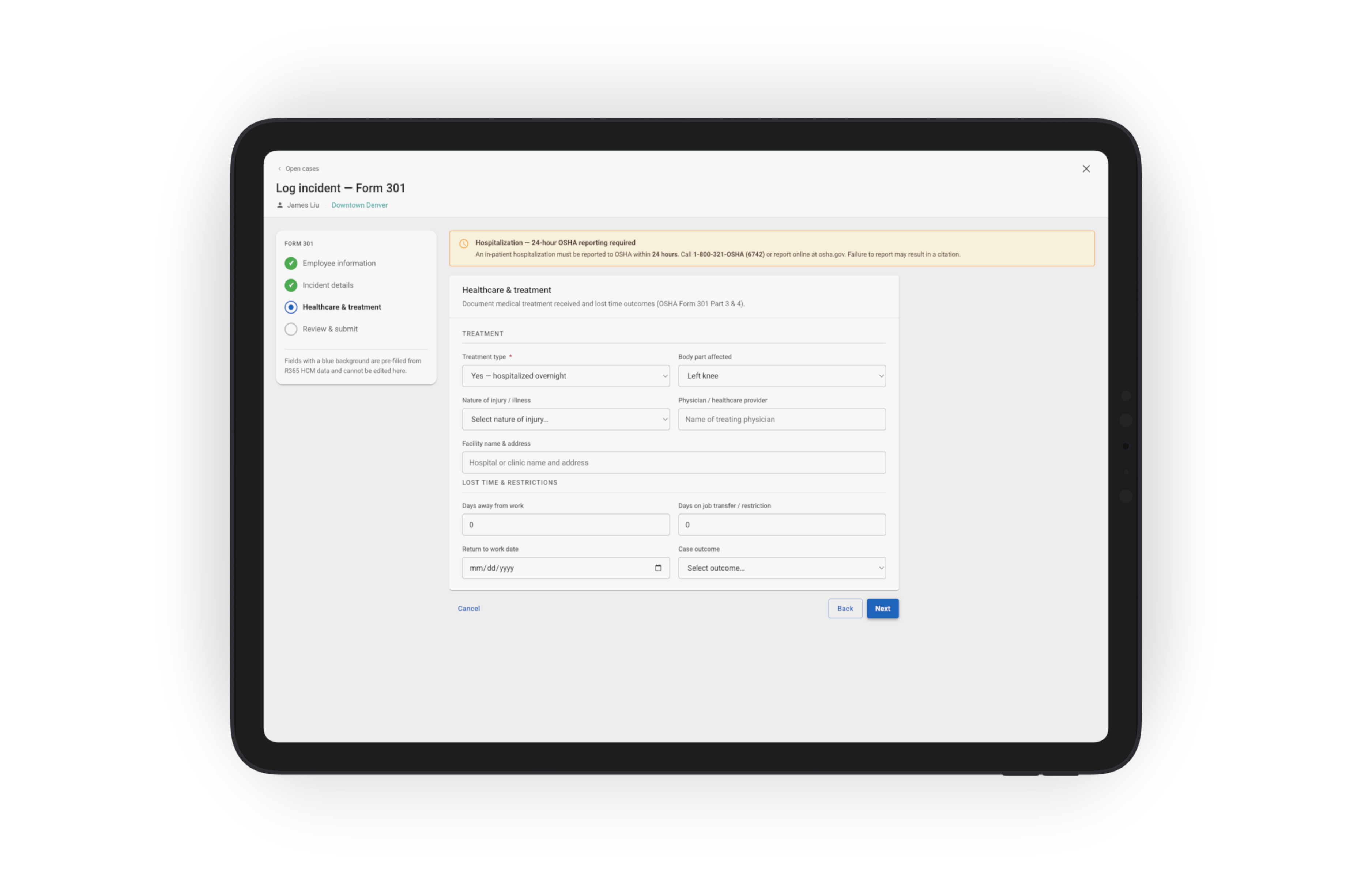
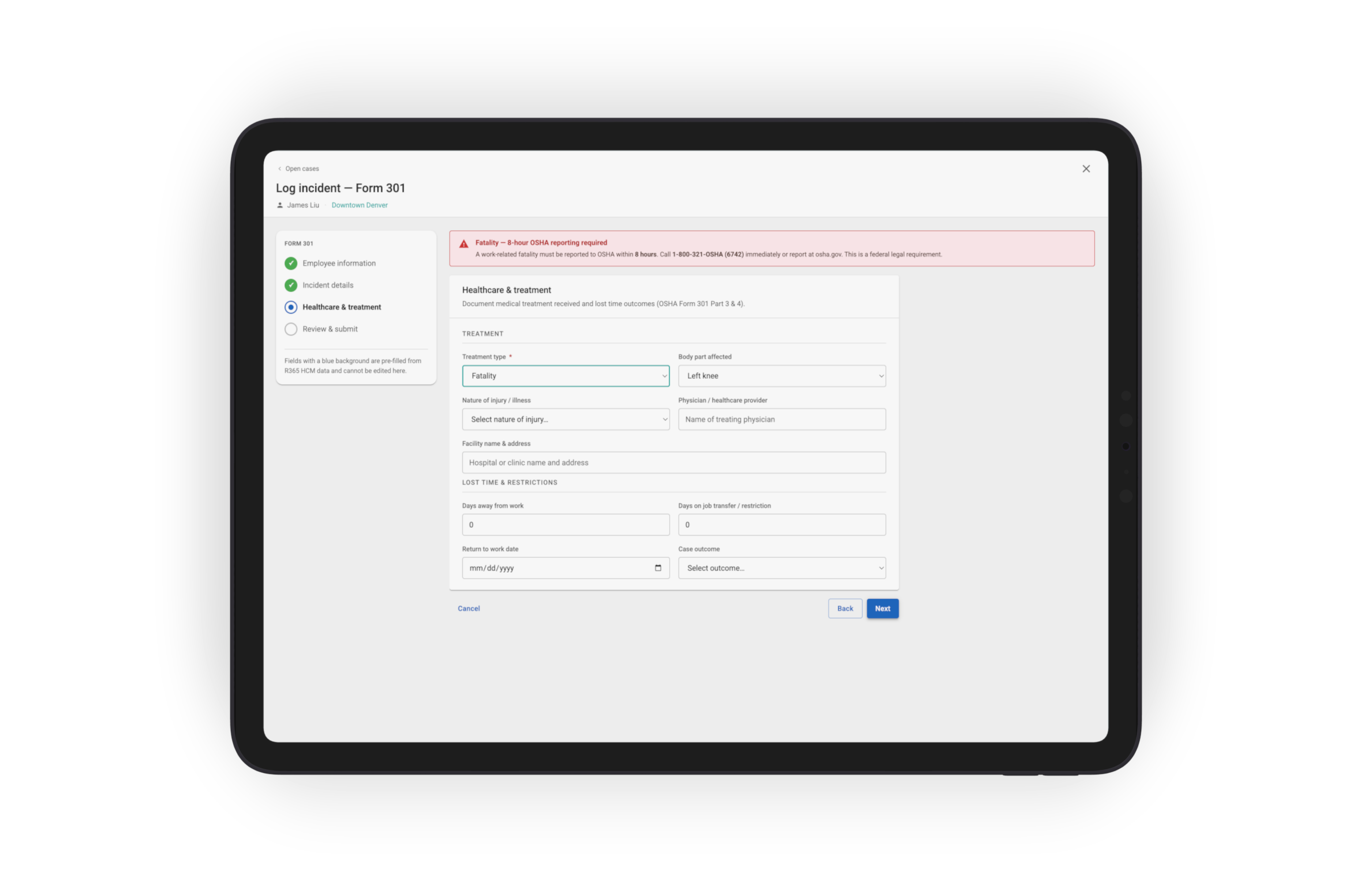
When a manager selects an incident outcome that triggers a federal reporting requirement — such as hospitalization, amputation, or fatality — the system surfaces a real-time compliance alert identifying the applicable OSHA reporting window (8 or 24 hours).
Flow 03 · Visibility
The R365 Safety tab — every case, every store, in one view
From fragmented spreadsheets to centralized case management
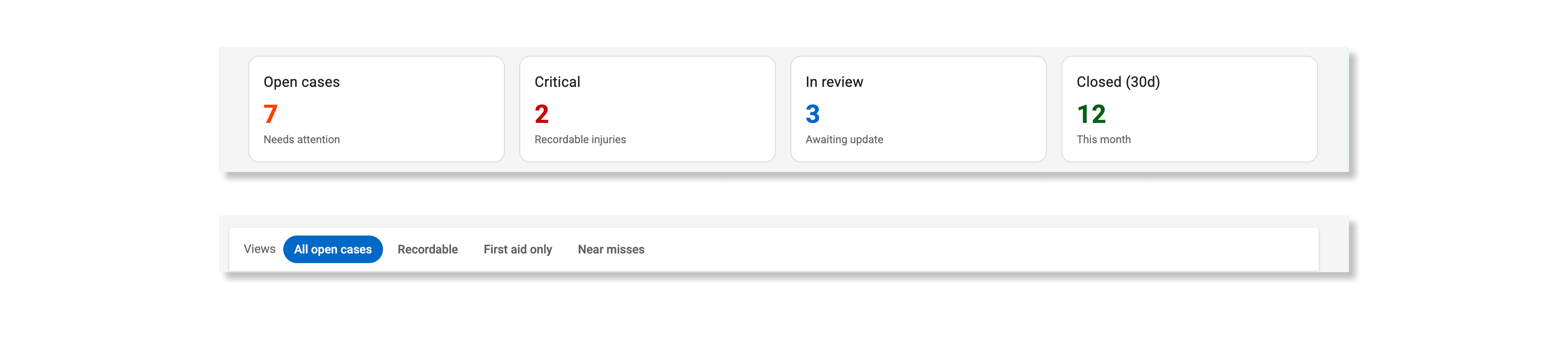
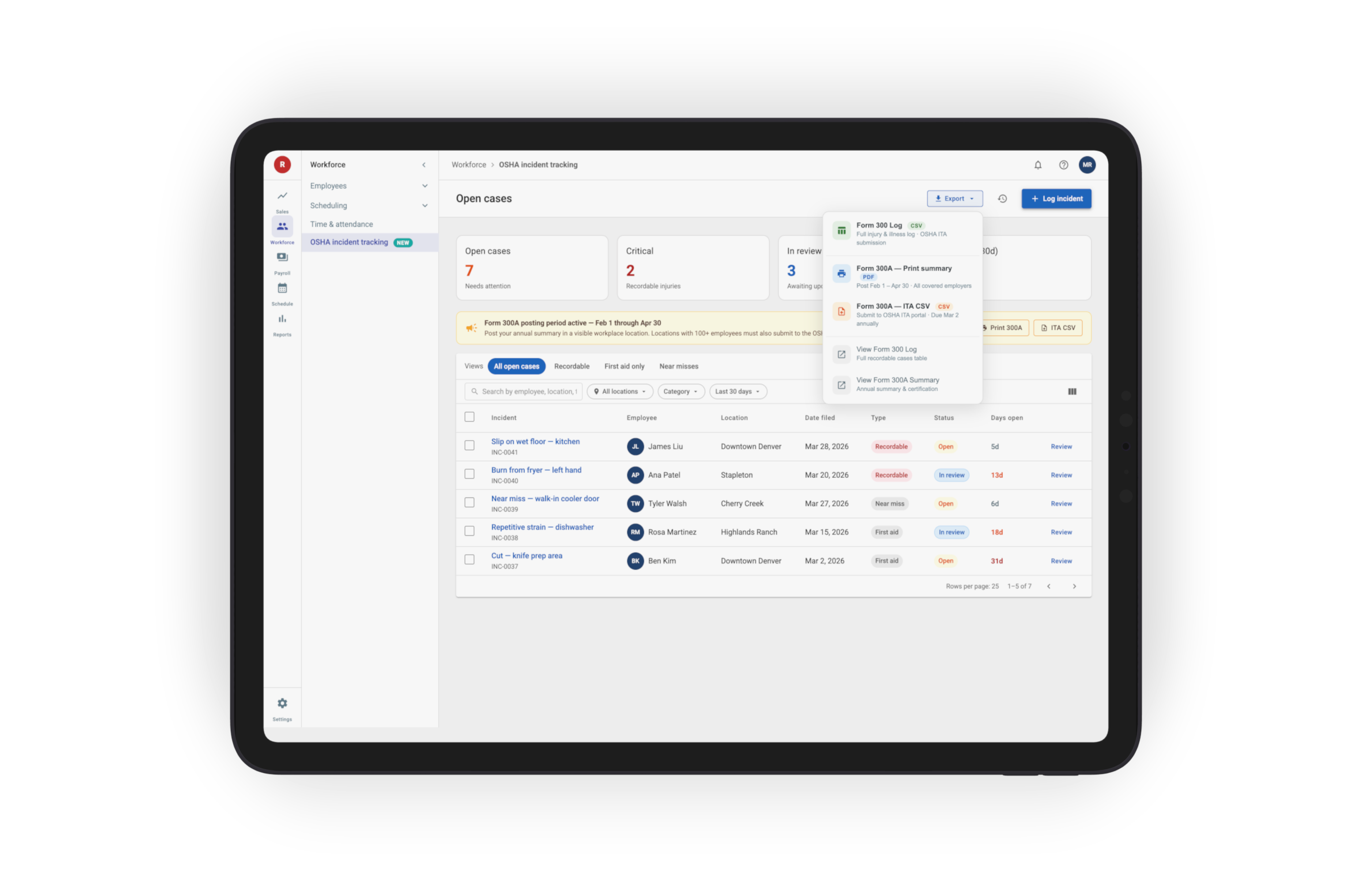
The dashboard consolidates incidents across locations into a single operational view. A scorecard summary — Open cases · Critical · In review · Closed (30d) — gives safety managers an immediate snapshot of organizational activity and risk.
Saved Views (All open · Recordable · First aid only · Near misses) alongside filters for location, incident category, and date range make incidents searchable across stores and reporting periods. Each row links directly into the incident record for investigation and review.The dashboard consolidates incidents across locations into a single case-management view. A scorecard row at the top — Open cases · Critical · In review · Closed (30d) — gives the safety manager the operational pulse at a glance. Saved Views (All open · Recordable · First aid only · Near misses) and filters (location, category, date range) make the long-tail of incidents searchable. Every row links to the case for review.
Compliance reminders surface where the work happens
When a regulatory window opens — the Form 300A posting period (Feb 1 – Apr 30), or the ITA electronic filing deadline by March 2 — a banner appears directly on the dashboard with the action one click away. Deadlines stop being something managers have to remember; the product reminds them where they already are.

Flow 04 · The module teaches itself
First-time tour
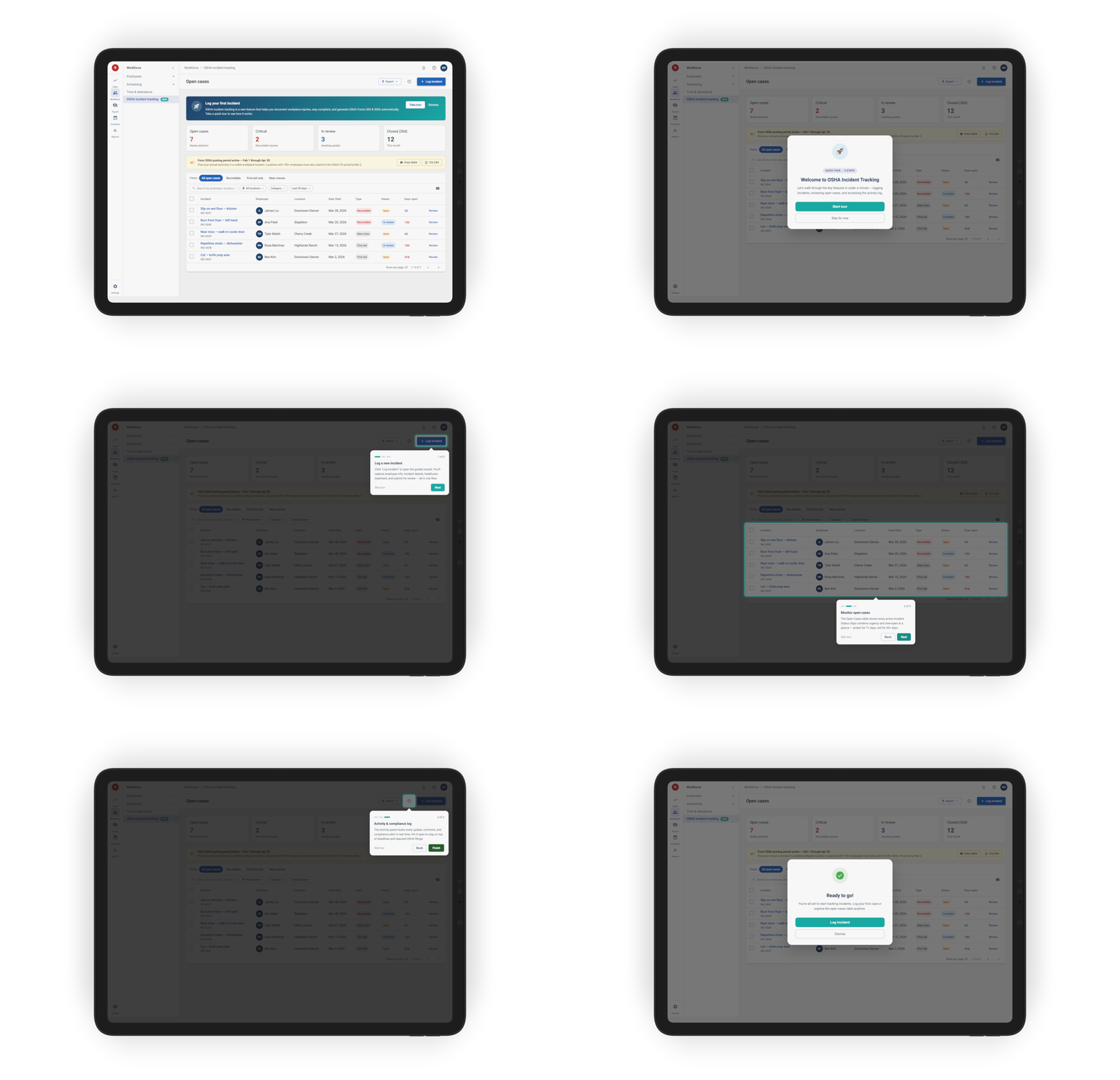
The first-time experience introduces managers to the Safety module directly within the product through a persistent onboarding banner and guided walkthrough. A short interactive tour walks users through the core workflows — logging incidents, reviewing open cases, and accessing activity history — without interrupting the operational flow or requiring external documentation.
The onboarding experience was intentionally lightweight: users could begin immediately, dismiss the tour, or return later without losing context.
Flow 05 · Year-end reporting in seconds
From spreadsheet reconciliation to one-click compliance
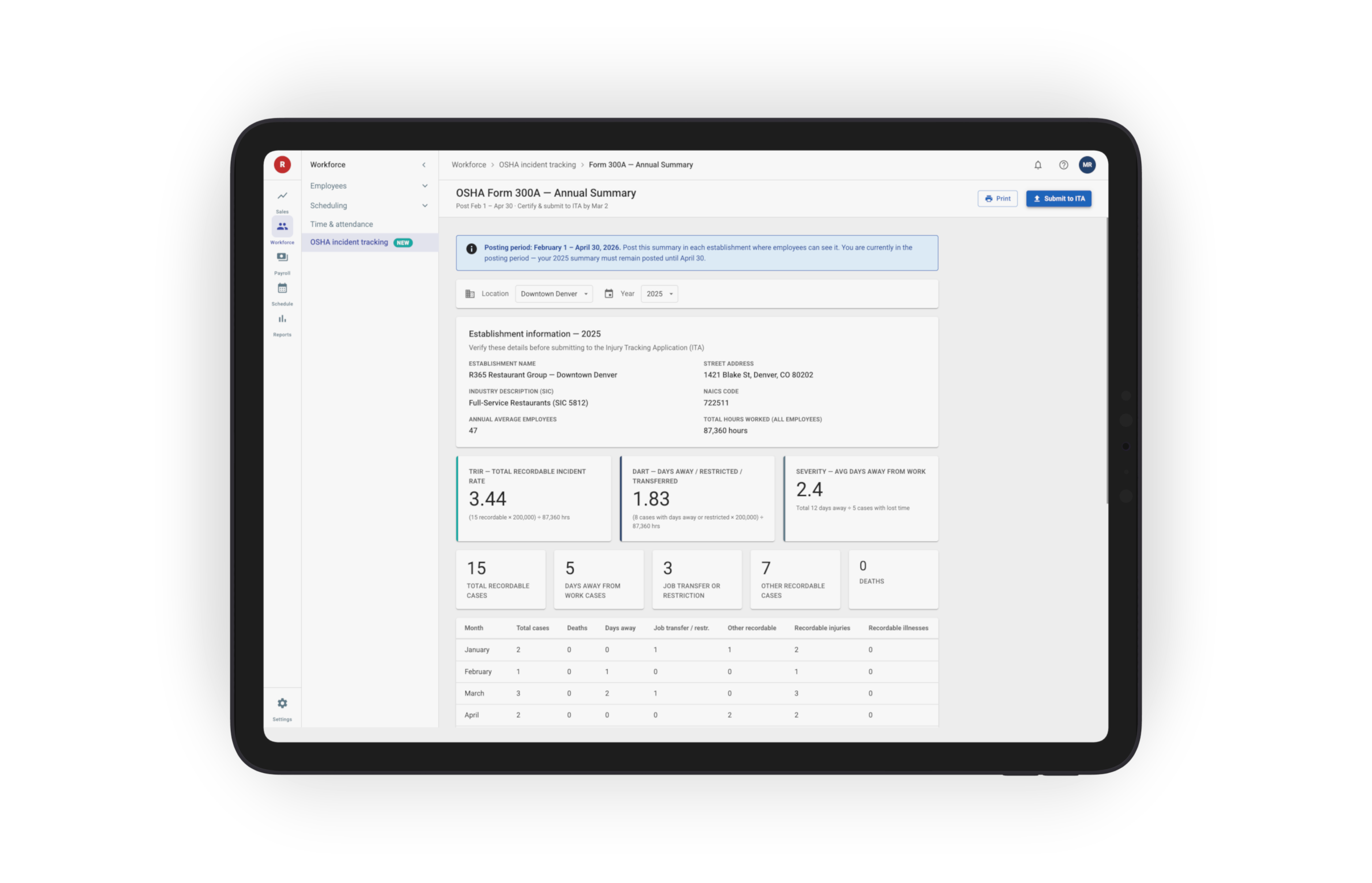
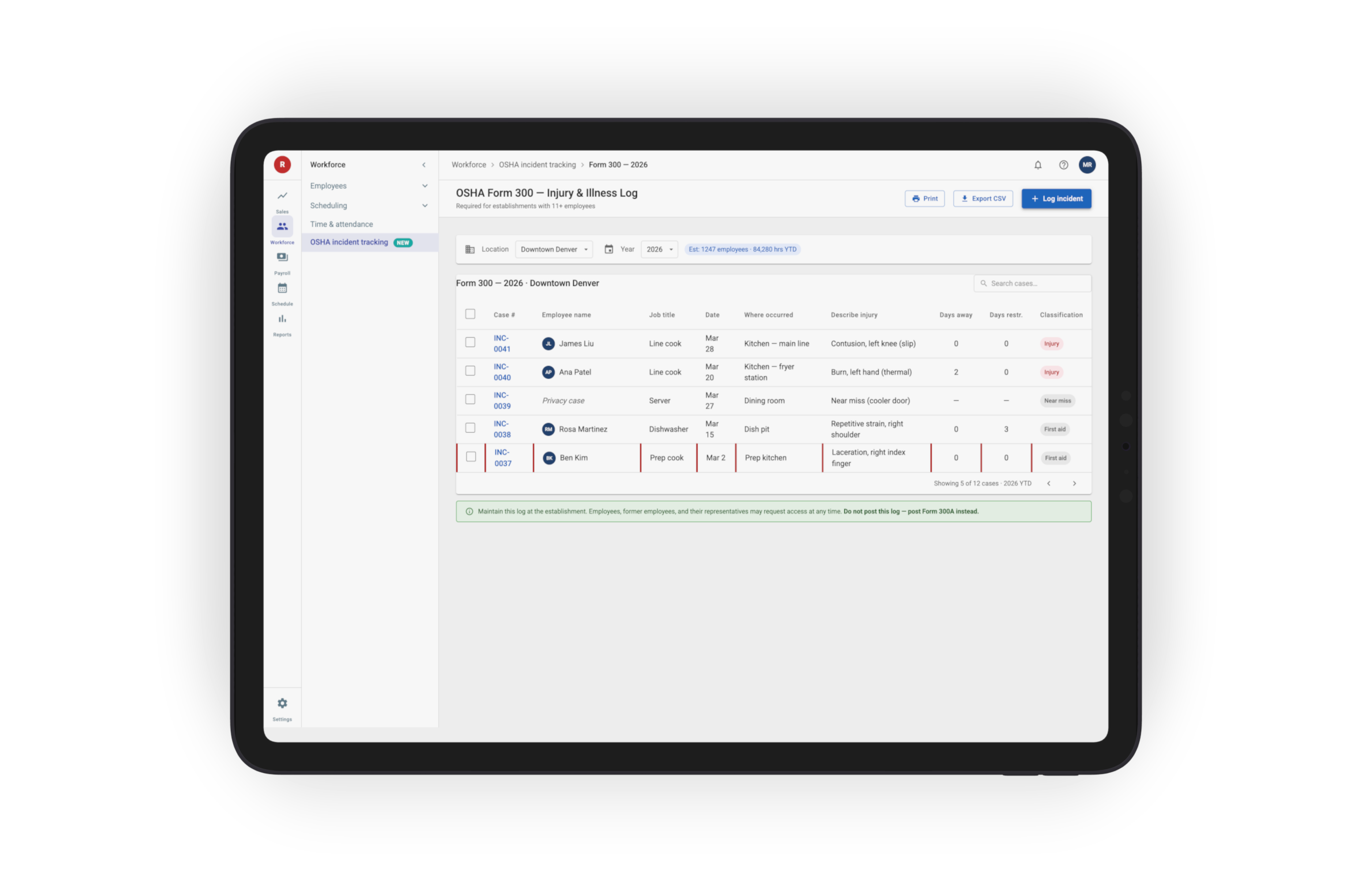
The export workflow generates three OSHA-ready outputs directly from incident data already captured in the system:
• Form 300 — log of work-telated Injuries and Illnesses
• Form 300A — annual summary for workplace posting (Feb 1 – Apr 30)
Incident details entered during case creation map directly to the required OSHA reporting fields, eliminating duplicate entry, spreadsheet reconciliation, and manual form preparation.
DESIGN DECISIONS:
Decision 01
Wizard over single form for incident entry
The OSHA workflow required more than 20 fields, making a single-page form difficult to scan and intimidating for infrequent users. The three-step wizard grouped the experience into manageable phases — Employee, Incident, and Treatment — while reusing an interaction pattern already introduced in the deductions module.
Decision 02
Surface compliance guidance at the moment decisions are made
OSHA terminology and reporting rules appear inline within the workflow instead of being separated into documentation or training materials. Terms like recordability and case classification include plain-language guidance directly within the form.
When an incident triggers a federal reporting requirement — such as overnight hospitalization or fatality — the system surfaces a real-time compliance alert immediately during entry rather than after submission.
Trade-off: additional product and engineering complexity to maintain compliance logic in-product.
Outcome: managers receive guidance at the exact moment decisions become legally significant.
Decision 03
Pre-fill data from HCM instead of asking managers to re-enter it
Employee information — including ID, role, hire date, work location, and supervisor — is automatically pulled from existing HCM records. Managers confirm existing information instead of re-entering it manually, reducing duplicate entry and preventing downstream reporting inconsistencies.
Decision 04
Make the audit log visible by default
Every incident action — including edits, status changes, and exports — appears in a persistent activity log within the workflow instead of being buried in secondary navigation.
Making the audit trail visible by default improved transparency, simplified investigations, and made incident history easier to review during audits.
Decision 05
Map incident data directly to OSHA reporting structures
Every field within the incident workflow maps directly to a corresponding OSHA Form 300 or Form 301 reporting field. This created a verifiable export structure where reporting outputs could be generated directly from operational data without manual reconciliation.
Trade-off: additional upfront design and engineering effort to define and validate field mappings.
Outcome: reliable OSHA exports with significantly lower reporting risk.
Decision 06
Compliance reminders surface on the dashboard
Form 300A posting window (Feb 1 – Apr 30) and ITA filing (Mar 2) show as banners — deadlines stop being something to remember.
DESIGN PATTERNS:
Patterns that scaled beyond deductions:
Several pieces of this module became patterns the broader R365 design system absorbed — anywhere we have high-stakes, history-sensitive records.
Pattern 01
Compliance alert
A real-time alert that fires when a user enters data that crosses a regulatory threshold. Names the specific rule, the deadline, and the action required — before the user has finished saving. Built first for OSHA hospitalization triggers; now used anywhere a configuration choice carries a legal deadline.
Pattern 02
Wizard (from deductions)
Multi-steps wizard applied to a new domain. Same skeleton, different content — proves the pattern's reach.
Pattern 03
HCM pre-fill
Form fields that read from existing HCM data and lock until the source record changes. Cuts entry time and prevents typos from propagating downstream.
Pattern 04
Field-to-form mapping
Every product field carries a documented mapping to its regulatory destination (OSHA column, IRS box). Makes exports verifiable and audits answerable.
Pattern 05
Inline field help
Plain-language definitions and real-time rule validation rendered at the field itself. Combines the rule with the reason — so users get both what's required and why — without ever leaving the form.
Pattern 06
First-time tour
Persistent banner → welcome modal → step-by-step guided tour. Built first for R365 Safety; adopted system-wide so users learn the rhythm once and recognize it everywhere a new module is introduced.
OUTCOMES:

Adoption
≤ 90 seconds to log a recordable incident
From the OSHA tab to a saved, compliant record. Measured in usability testing against the legacy spreadsheet workflow that took 8–12 minutes.
Compliance
1-click Form 300 / 300A export
Year-end compliance moves from days of manual stitching to a single export action. Forms map 1:1 to OSHA-required columns, with audit trail attached.
Business
R365's first dedicated compliance module
Opens a new sellable surface, differentiates against generic HCM tools, and lays the foundation for adjacent F&B compliance modules (heat exposure, sanitation, ergonomics).
WHAT'S NEXT:
From recordkeeping to safety intelligence
The MVP solves the foundational problem: accurate, compliant incident recordkeeping that does not depend on OSHA expertise. Future phases build on that operational data to support investigation workflows, analytics, and proactive safety management.
Phase 02
Investigation workflows & full forms automation
Witness statements, corrective-action tracking with assigned ownership, follow-up reminders, and automated generation of Forms 300, 300A, and 301 — closing the loop from incident through investigation through filing.
Phase 03
Analytics & industry-specific safety insights
Trend dashboards, root-cause analysis, and F&B-specific metrics — heat exposure, repetitive-strain patterns, sanitation breaches. Compliance becomes a starting point; the analytics layer turns it into proactive safety management.
Phase 04
AI-driven training assignments — closing the loop
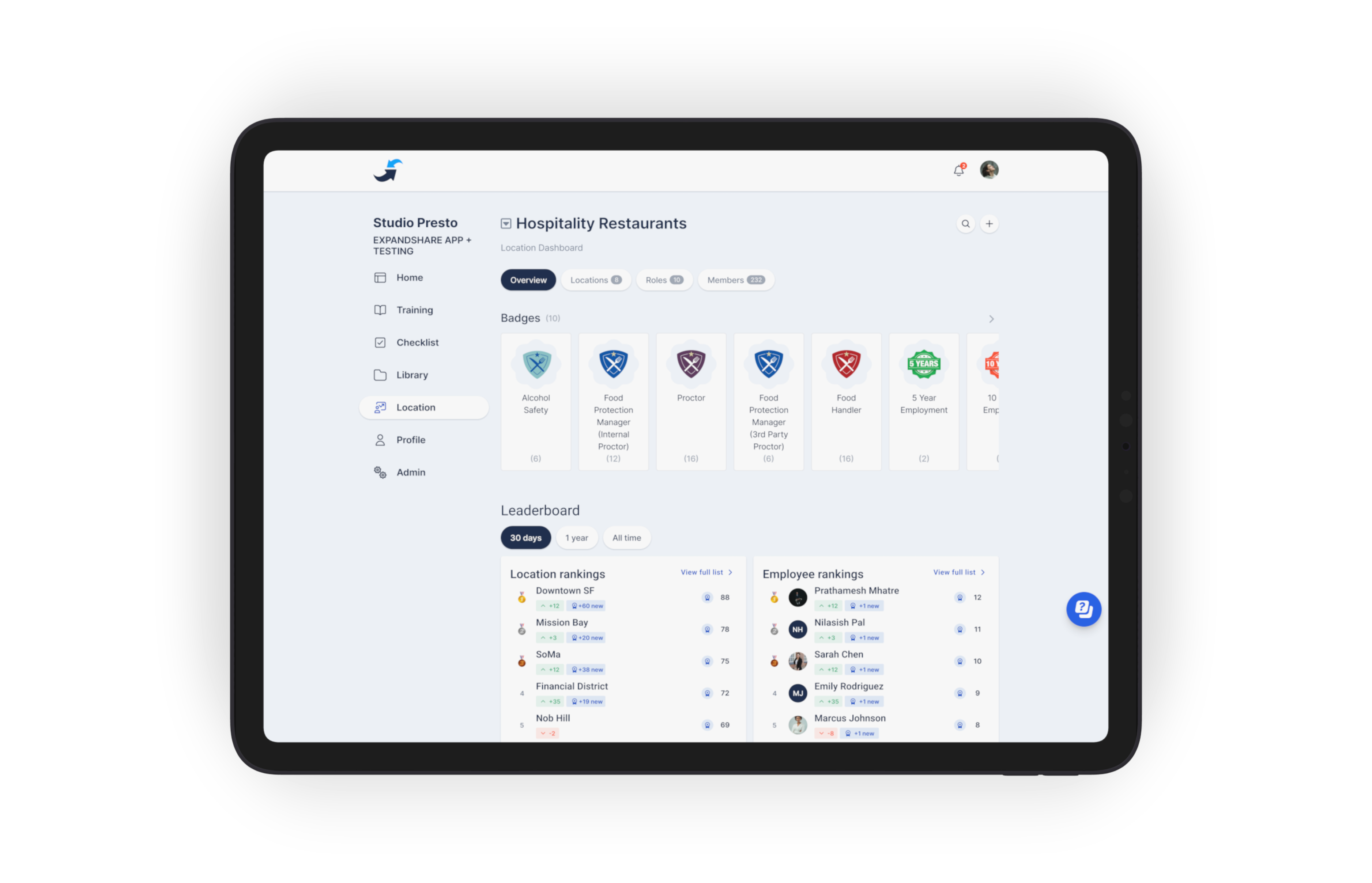
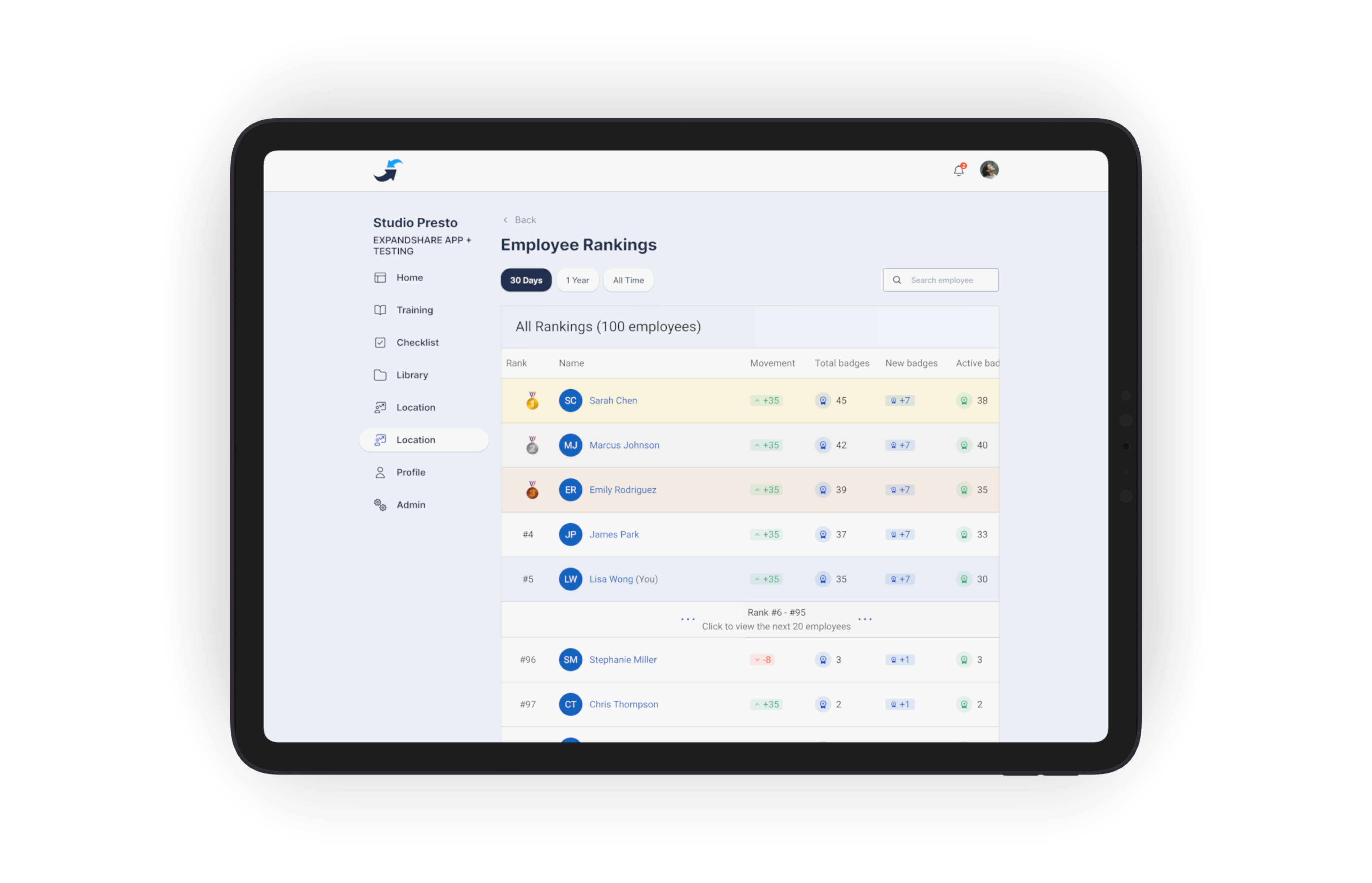
R365 Safety connects to R365's training system. AI analyzes incident patterns by location, shift, and injury type — a spike in knife cuts at one store, repetitive-strain incidents on a specific shift, slips concentrated to a single time of day — and assigns targeted training courses to the right managers and stores automatically. The training system's gamification layer — points, streaks, leaderboards, recognition — turns those assignments from a compliance chore into something employees actually want to complete. Courses don't just get sent; they get finished. Recordkeeping stops being a backward-looking document and starts driving the behavior that prevents the next incident.
Beyond
Adjacent compliance modules
R365 Safety sets the architectural pattern (employee-profile entry, wizard logging, compliance alerts, mapped exports). The same shape applies to wage-and-hour compliance, FMLA tracking, EEO reporting, and the federal posters/notices customers also need.
