


Employee deductions in R365 cover everything from elective benefits to court-ordered garnishments — every dollar taken out of a paycheck. The legacy module worked, but it was slow, error-prone, and the kind of screen managers asked for help with rather than trusted. I redesigned the core flow of the lifecycle — arriving from the employee profile, adding a deduction, editing an active deduction, and ending one — and the feature is now live in R365.
The impact was immediate: escalated support tickets dropped 71.5% (256 → 73), and payroll efficiency rose 15.8% — driven by simplified setup, automated multi-deductions math, and real-time validation that catches errors before payroll runs.
What it delivers to users
For the restaurant manager running payroll, the redesigned module makes the routine work fast and the hard work safe. Setup steps were cut down. Multi-garnishment math — the single highest source of payroll errors — is now calculated automatically instead of by hand. Legal limits are explained inline, so a manager catches a mistake at the moment of entry, not on payroll day. For the employee, this shows up as the only outcome that matters: a paycheck that's accurate and on time.
What it delivers to the business
Compliant garnishment calculation by default reduces legal exposure and the support burden that used to come with manual errors. A soft-close model and inline audit trail keep past pay runs intact, make renewals trivial, and turn audits from a multi-day project into a single screen. The net effect is a payroll surface customers actually trust — driving retention, lowering customer-success cost, and making it easier to sell against competitors who still treat compliance as the customer's problem.
PROJECT TYPE:
SaaS
Business Facing Products
Web-Based
PROJECT ROLE:
Senior Product Designer
YEAR:
2025
SKILLS:
End-to-end Product Design
Design Systems & Scaling
User Research & Usability
Cross-functional Collaboration
PROBLEMS:
Deductions were the screen managers feared
Restaurant operators run payroll for hourly, tipped, and salaried staff — often across multiple locations. When a court order shows up or a 401(k) percentage changes, the manager has minutes, not hours, to get it right. The legacy module made that hard.

What was broken:
Issue 01
Multi-garnishment math was manual
The system didn't calculate priority, ordering, or the combined CCPA cap when orders stacked — leaving managers to do it by hand, with errors landing on either the employee's paycheck or the business's compliance record.
Issue 02
Legacy and modern deductions coexisted without clear boundaries
Old and newly configured deductions appeared side by side with little distinction, making conversion, duplication, and maintenance workflows difficult to navigate safely.
Issue 03
Weak validation
Federal and state deduction limits — including CCPA caps, disposable earnings rules, and state-specific overrides — were often discovered only after payroll processing failed or produced incorrect deductions.
Issue 04
The setup workflow lacked consistency
The wizard experience varied between deduction types, creating inconsistent interaction patterns and unclear terminology. Phrases like “each payment” failed to account for off-cycle payroll runs and edge cases.
Issue 05
Garnishment workflows lacked dedicated structure
Garnishments existed as a generic deduction type despite requiring additional compliance-specific fields such as case number, priority, agency details, and court information.
Issue 06
Fragile history
Edits could retroactively rewrite past pay periods and break audit trails.
Issue 07
Deduction end states lacked clarity
Managers could not easily determine when a deduction would stop processing, and completed deductions disappeared from primary workflows — making renewals, audits, and employee support harder to manage.
Issue 08
Deduction history was fragmented across the employee profile
Active and completed deductions lived in separate areas of the product, forcing managers to switch contexts to understand a single employee’s deduction history.

SOLUTION:
One deductions surface, designed for the hardest case
The redesign anchors deductions on the employee profile and walks managers through a single full-page wizard with clear step boundaries — selection → configuration → review → confirmation. Legal limits are surfaced where the manager is making the choice, not after payroll bounces. Calculation logic and compliance rules now live in the backend — no manual math, with alerts and errors surfacing ahead of payroll, never after it.

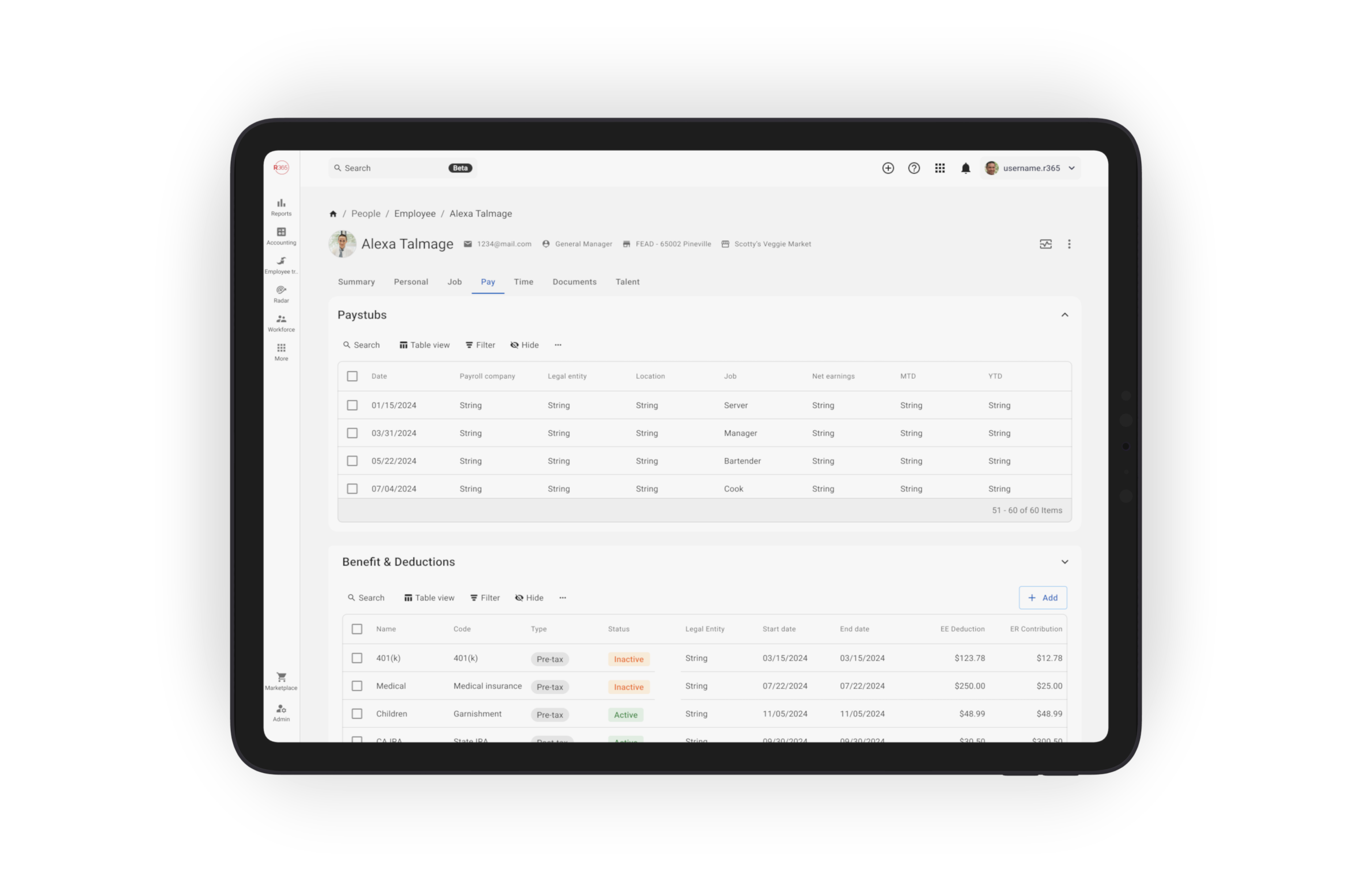
Starting from the employee profile
Every deduction action begins on the employee record. The profile is the manager's home base — pay rates, contact info, documents, and the deductions tab live together. Active and ended deductions sit on the same screen, so renewals and audits don't require digging.
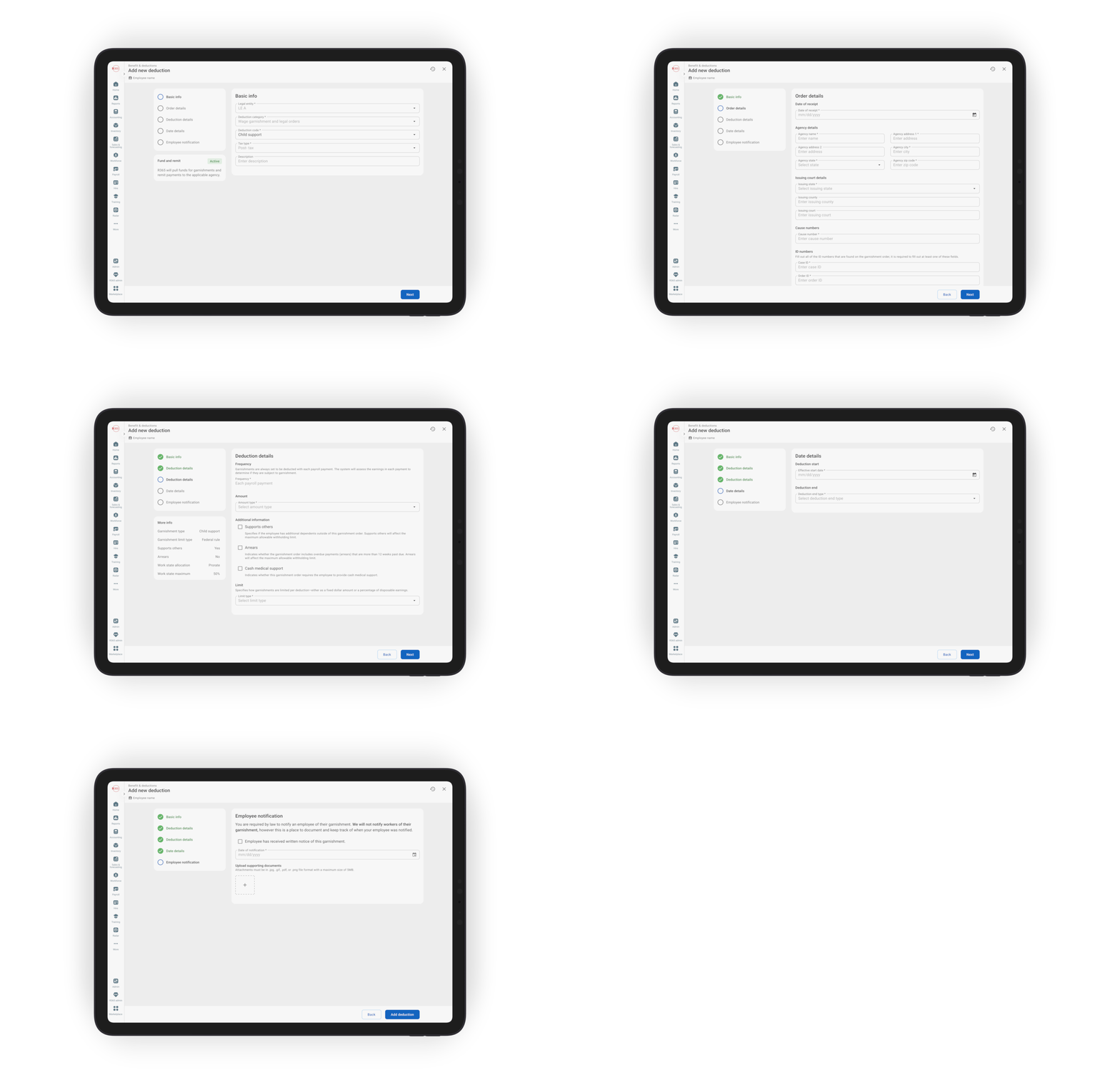
Adding a new deduction
The wizard adapts to the deduction type — routine ones stay short, complex ones (a wage garnishment, for example) branch into a guided path with the fields that matter.
Reusable "More info" panels explain the rule behind each field, and warnings split into two classes: hard blocks for illegal configurations and strong recommendations a manager can override.
When records stack — multiple garnishments on the same employee — the system handles priority, ordering, and combined caps automatically, showing the per-paycheck breakdown before save. Calculations are accurate and compliant by default, never a manual checklist.
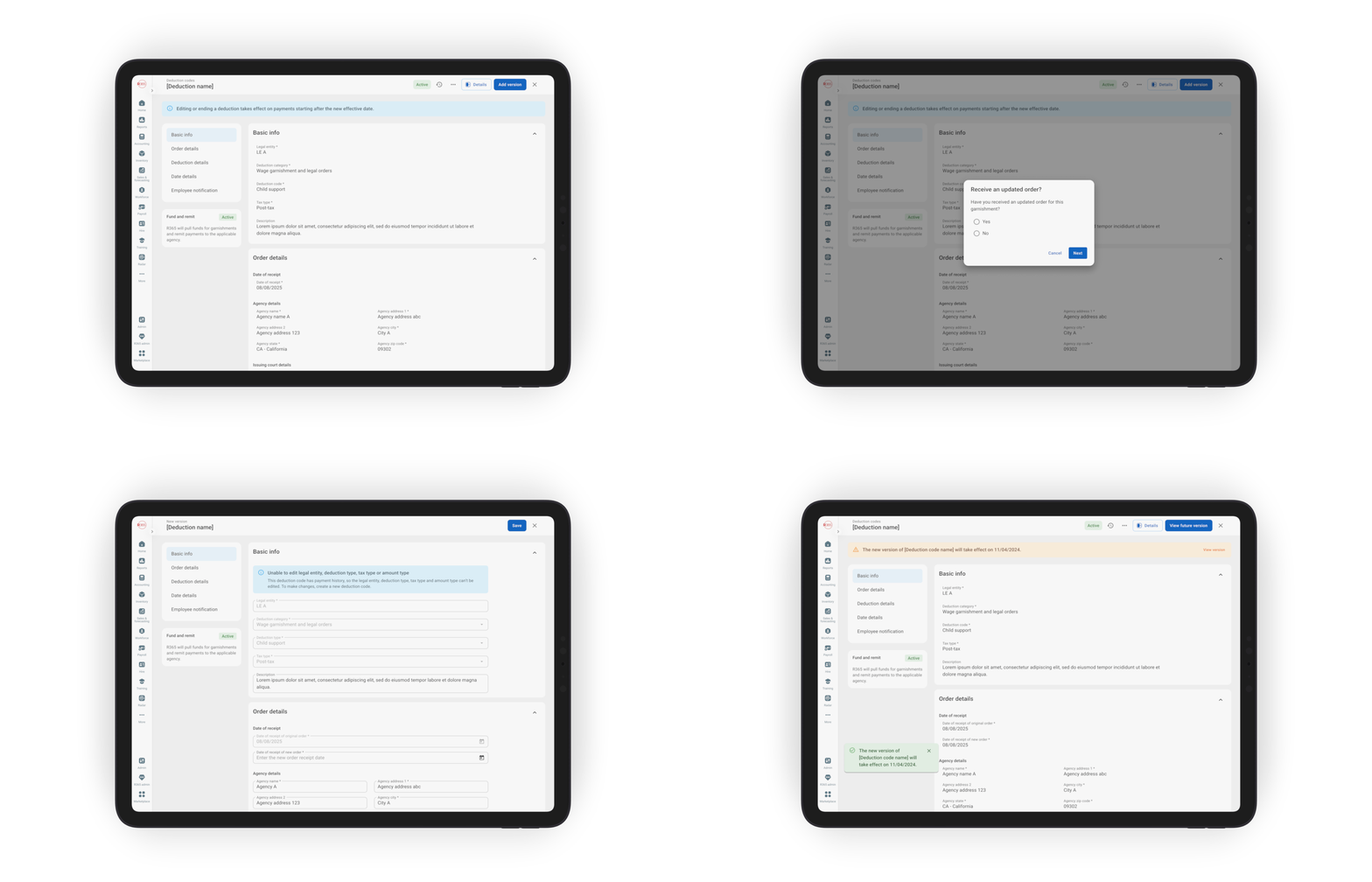
Editing an active deduction
Edits apply prospectively by default. Past pay runs stay locked. Every change is captured in an audit log so managers — and auditors — can answer the question "when did this change?" without guesswork. Legacy records can be safely viewed, edited, and ended without corrupting history; converting or duplicating them is guarded so a small mistake doesn't break years of audit data.
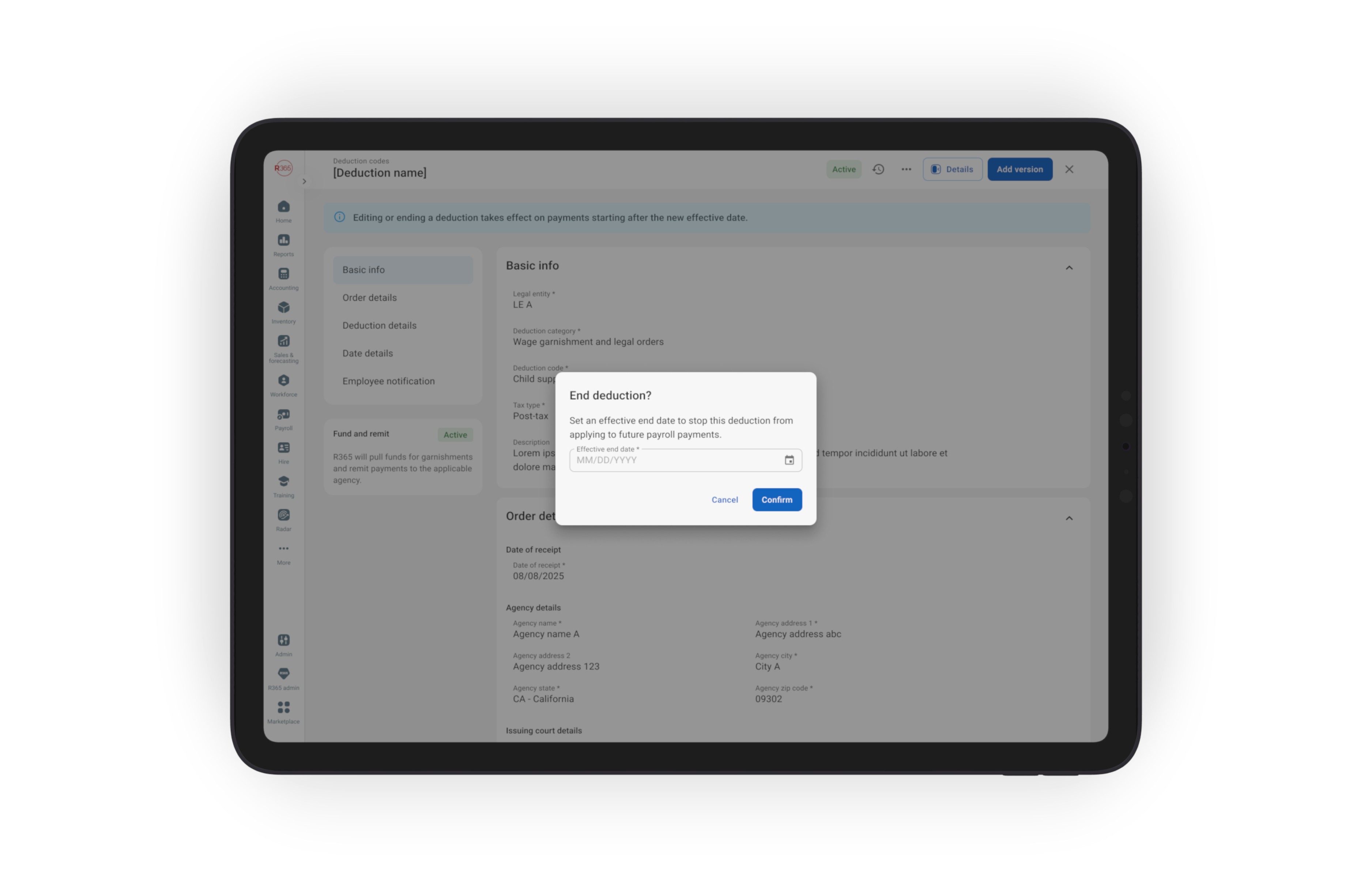
Ending a deduction
Ending is a soft-close: the deduction moves to an ended list with full history preserved, never deleted. The summary names the exact last paycheck and — for garnishments — captures whether the case was satisfied or terminated by the court.
DESIGN DECISIONS:
Decision 01
Branch the workflow, not the experience
Routine deductions and garnishments share the same entry point, navigation structure, and review step. Only the middle portion of the wizard adapts based on deduction type. This kept the experience cohesive while allowing garnishments to support additional compliance complexity without feeling like a separate product.
Decision 02
Validate legal limits at the moment of entry
Federal and state deduction limits surface inline during setup, with contextual helper copy explaining why constraints exist and what calculations are being enforced.Federal and state caps surface at the moment of entry, with helper copy explaining why a number is required.
Trade-off: additional engineering complexity within the rules service.
Worth it: managers cannot save deductions that exceed legal withholding limits.
Decision 03
Automate multi-garnishment calculation — don't ask the manager to do the math
The system automatically resolves deduction priority, CCPA caps, and state-specific overrides — removing manual withholding calculations from the payroll workflow and reducing configuration errors.
Decision 04
Two warning classes: hard blocks vs. strong recommendations
Illegal configurations get a hard block. Legal-but-risky configurations get a strong recommendation the manager can override. The split keeps the system trustworthy without becoming paternalistic.
Decision 05
Apply edits prospectively by default
Changes affect future pay periods only and never rewrite historical payroll records. Retroactive corrections follow a separate workflow with stricter controls and additional guardrails.
This preserves audit integrity while creating an intentional path for rare correction scenarios.
Decision 06
Soft-close, never delete
Ended deductions remain visible within the employee profile rather than disappearing from the system entirely. This simplified renewals, reduced duplicate setup errors, and made audit reviews significantly faster.
Trade-off: increased list density.
Solution: grouped collapsing and quieter visual treatment for inactive records.
Decision 07
Clear status, surfaced inline — not buried in tabs
Every deduction shows its current status right on the profile: active, ending soon, or ended. Records approaching their end date get a visual indicator and a tooltip that names the exact last paycheck, so managers see what's about to change without opening a record. Keeping all statuses on one screen matches how managers think — deductions as one thing across time, not separate tabs — and cuts a layer of navigation.
DESIGN PATTERNS:
Patterns that scaled beyond deductions:
Several pieces of this module became patterns the broader R365 design system absorbed — anywhere we have high-stakes, history-sensitive records.
Pattern 01
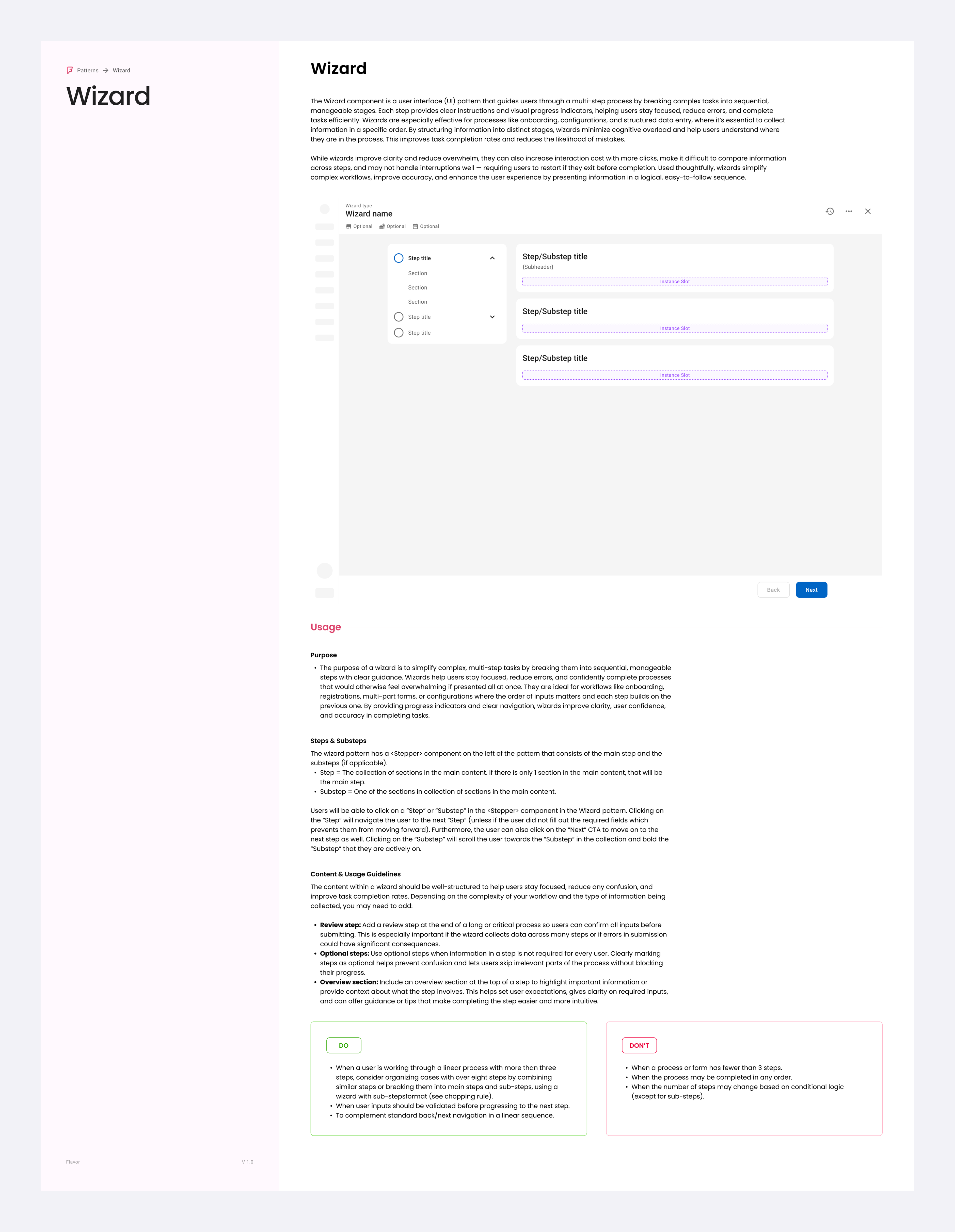
Wizard
A multi-step form for any setup that needs structure — selection, configuration, review, and confirmation. Originally built for deductions, the wizard is now a documented design-system component used anywhere a complex setup carries financial or compliance weight.
Pattern 02
"More info" panels for complex rules
A reusable side card that clearly displays the rule behind a field — type, limit, allocation, thresholds — as a structured reference next to the form.
Pattern 03
Hard blocks vs. strong recommendations
Two warning classes, applied consistently. Illegal = block. Risky = recommend with override. Used wherever a configuration carries legal weight.
Pattern 04
Inline rule validation
Legal and financial limits trigger an inline error or alert at the field itself — the user sees the problem the moment it happens, not after payroll bounces.
Pattern 05
Automated multi-record calculation
When records stack (multiple garnishments, layered benefits), the system handles priority, ordering, and combined caps — and previews the result before save. Compliant math becomes the default, not a manual checklist.
Pattern 06
Prospective-by-default edits
Edits affect the future; the past is locked. Retroactive changes get a deliberate, separate path. Used wherever a record drives historical financial outcomes.
Pattern 07
Soft-close lists
Closed records stay on the profile in a muted state with full history. Reduces duplicate-create errors and gives audit a single source of truth.
Pattern 08
Last-impact preview
Before any irreversible action, name the exact paycheck or pay period that will be affected. "This will be the last paycheck with this deduction" beats "Are you sure?"
Pattern 09
Audit-trail entries
Every edit logs who, when, and what changed — visible in-context, not buried in a separate report.
OUTCOMES:

Compliance
Accurate deductions calculations by default
Multi-deductions math is now automatic — priority, ordering, and combined CCPA caps are calculated by the system, not by the manager. Inline validation and hard blocks make compliant configuration the default state, not a careful manual exercise.
Speed
Faster setup for routine deductions
The shared wizard skeleton meant routine deductions take fewer steps — managers spend less time in payroll admin and more time running their restaurant.
Trust
A history that doesn't break
Prospective-by-default edits, soft-closed records, and inline audit trails mean past pay runs stay intact and renewals stop being duplicate-add disasters.
WHAT'S NEXT:
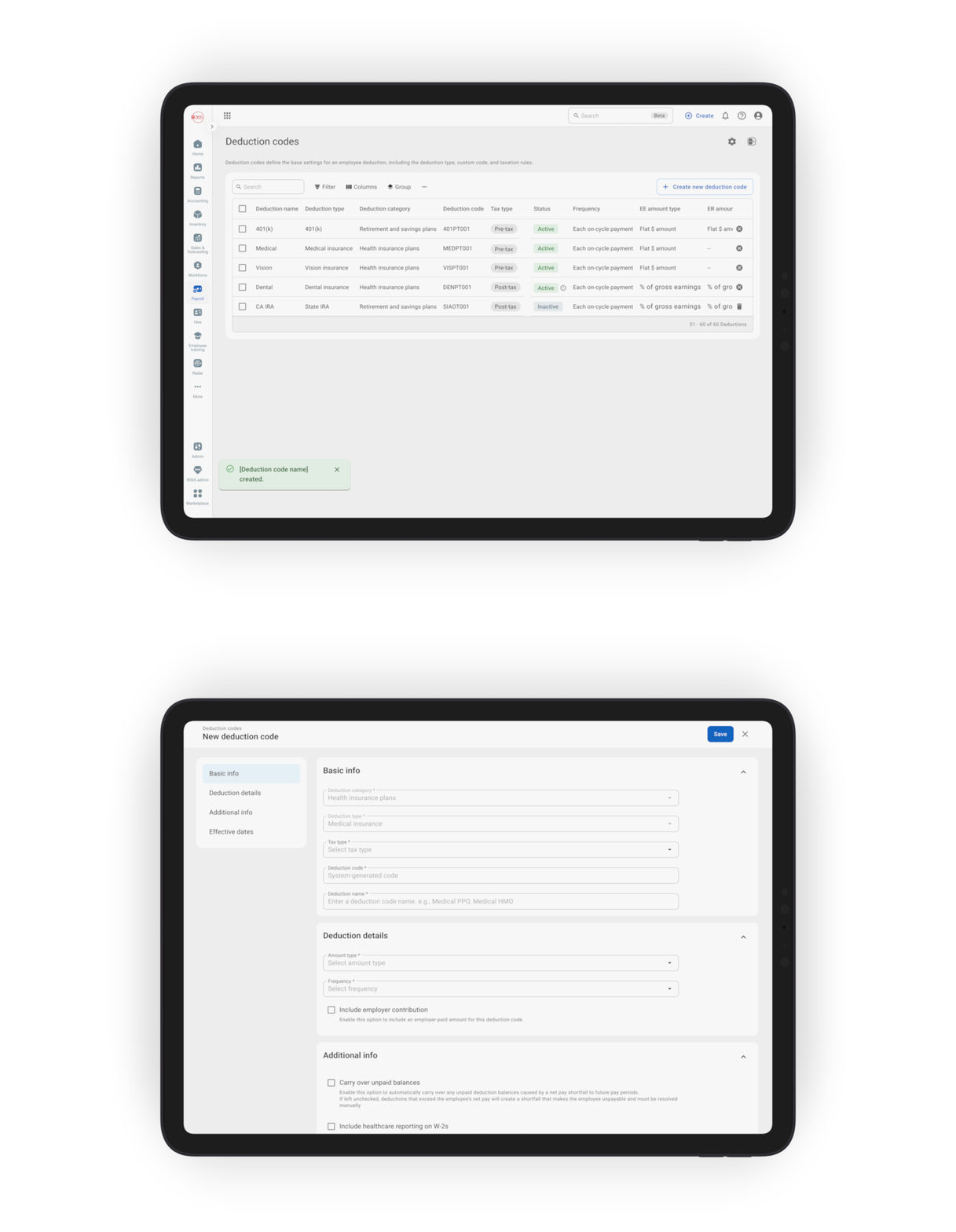
Custom deduction codes — let companies define their own rules
Today, the deduction wizard uses a single universal taxonomy: every restaurant sees the same options. The next step is letting companies (or restaurant groups) create their own custom deduction codes — so the picker a manager sees when adding a deduction reflects what their organization actually offers, not the full universal set.
WHAT IT UNLOCKS:
Unlock 01
Fewer errors at the individual level
Managers pick from the company's curated list, not the universal one. Wrong choices drop because the available options are pre-validated by HR.
Unlock 02
Company-level limits, set once
A custom code locks in deduction category, type, tax treatment, frequency, and amount type — applied automatically every time someone adds a deduction.
Unlock 03
Faster onboarding for new managers
New hires don't have to ask which plans the company supports. The picker is the answer.
Unlock 04
Consistent compliance across locations
Every restaurant in a group adds deductions the same way, against the same pre-approved set — fewer location-by-location surprises at payroll.
